Drivs med Planet!
Senast uppdaterad: 13 June 2022 kl 13:30
av Leif Nixon (nixon)
den 21 March 2022 kl 17:51
MÖP-uppdatering Tnr 211848
Idag behöver vi prata om termobariska vapen. Normala sprängämnen, sådana som används i vanliga vapen, är så att säga "self-contained" - de innehåller i sig själv allt som behövs för att skapa en explosion. Det går utmärkt att avfyra en pistol i rymden, för krutet exploderar av sig själv. Termobariska vapen, däremot, använder syre från luften som en av beståndsdelarna för att skapa en explosion. De bygger på att finfördela någon form av bränsle i luften, och sedan detonera molnet med hjälp av en liten vanlig sprängladdning.
Det är rätt svårt att förklara verkan av en termobarisk explosion på ett intuitivt begripligt sätt, men om ni har sett filmer från någon av tsunamikatastroferna vet ni att en tsunami inte bara är en ovanligt kraftig våg; det är snarare som om hela havet höjer sig och flödar in över land. Man kan ha den bilden i huvudet.
En vanlig sprängladdning ger en skarp chockvåg; det är som om man slänger en sten i ett badkar och orsakar en cirkelformig våg på vattnet. Eftersom en termobarisk explosion inte kommer från en enda punkt, utan orsakas av ett helt moln som exploderar, kommer det en hel vägg av luft. Det är som om man snabbt skulle lyfta ena änden av badkaret så att en jättevåg slår iväg mot andra änden.
Och efter den stora tryckvågen från den termobariska explosionen kommer ett undertryck. (Man pratar ibland om termobariska vapen som "vakuum-bomber"). Det blir som en stor pumprörelse genom luften. Tänk er att ni ställer ner den där badkarsänden direkt när vågen farit iväg - då har ni en djup vågdal i er ände.
Den här pumpande rörelsen är väldigt effektiv för att förstöra byggnader och strukturer, och människokroppar. Särskilt lungorna blir sönderslitna av tryckvågen.
Explosionen ger också upphov till en våg av hetta (det hörs på namnet: "termo" - värme, "bar" - tryck) som bränner sönder allt i sin väg.
En stor termobarisk explosion är bara snäppet under ett taktiskt kärnvapen.
I videon nedan syns en TOS-1A. Det är ett ryskt vapensystem som skjuter iväg raketer med termobariska sprängladdningar, upp till 24 stycken i en enda salva. (Branden som uppstår är buskage som antänds av raketavgaserna.)
Just den här salvan skjuts mot Mariupol. Även om 80% av stadens infrastruktur är förstörd, finns det fortfarande tiotusentals civila kvar.
av Leif Nixon (nixon)
den 18 March 2022 kl 21:26
MÖP-uppdatering Tnr 182224
Fler och fler människor slängs ner i köttkvarnen i Ukraina, utan några nämnvärda resultat. Ryssland verkar oförmöget att släppa det som bevisligen inte funkar, utan fortsätter att kasta in unga pojkar för att slaktas.
I Mariupol sökte barnfamiljer skydd i en teater där man hade gjort stora markeringar i marken utanför: "дети" - "barn" (bild nedan). Den enda effekten det hade var att teatern blev ett mål för ryska flygvapnet. De enda säkra uppgifterna som finns just nu är "många har överlevt".

Jag möter hela tiden personer som har svårt att bearbeta det här. "Men, kan de verkligen bomba barn med flit?". Det är det här jag har försökt förklara i flera år. Det här är vad Ryssland gör. De har åter och åter igen visat att deras taktik är att skapa största möjliga lidande bland civilbefolkningen.
Jag lägger också till en film från Voznesensk, staden som jag nämnde häromdagen, som käkade upp en hel mekaniserad bataljonsstridsgrupp. Innehållsvarning: den börjar med liksäckar med döda ryska soldater. Men resten är sevärd.
Slutligen:
Det är förmodligen rätt få av er som missat att jag är engagerad i Hemvärnet. Vi är runt tjugotusen soldater, och vi har på kort tid fått tiotusen ansökningar. Vi är glada, men det kommer att ta lång tid att processa alla frivilliga personer, och om man inte har tidigare militär erfarenhet hamnar man lite längre bak i kön.
Jag vill peka på att vi bara är en av en lång rad frivilligorganisationer, och att det finns många, många ställen där man kan göra konkret, omedelbar nytta som frivillig. Ett bra ingångsställe är https://www.frivilligutbildning.se/.
Särskilt vill jag slå ett slag för två alternativ:
- Röda Korset. Det är alltid Röda Korset som står främst och som håller ut längst.
- Kommunernas FRG:er; frivilliga resursgrupper. Där kan man göra omedelbar nytta utan att lära sig skjuta ihjäl andra människor med automatkarbin. Googla "[kommunnamn] FRG".
Mermaid diagrams can be displayed within Markdown · Issue #372 · github/roadmap
av dentarg
den 23 January 2022 kl 17:56
Currently planned for Q1 2022 – Jan-Mar according to the roadmap issue.
I wonder if it will be supported by the /markdown endpoint in the REST API? (If it will include the SVG code for it.)
"These assistants are all deeply flawed."
av dentarg
den 28 December 2021 kl 22:57
- John Gruber comments on Alexa tells 10-year-old girl to touch live plug with penny
Up Again!
av Hugo Hörnquist (hugo)
den 28 October 2021 kl 22:00
My blog (and server in general) is up again! I still host it on that puny server. The problem was however that my parents ISP earlier misbehaved with their DHCP-server, and their front line support not knowing anything.
ComHem has however since been bought by Tele2, and while I can't vouch for their customer service, they have at least configured their DHCP server correct, allowing both their home router and this server to get their public IP:s as expected.
Now we just hope that everything keeps working until we finally get IPv6.
Macro Walking
av Hugo Hörnquist (hugo)
den 22 December 2019 kl 23:00
Understanding Lisp-macros is hard, even harder is understanding how to effectively use them. Here I delve deeper into code walking through macros on my journey to really understand what makes Lisp macros, and by extension Lisp, unique.
One of the best information sources for advanced macros I have found is the book Let over Lambda, which I'm currently (slowly) making my way through. So far the major take-away from it is that macros are my tool for parsing lisp code [Section 5.4].
The code in this page is written in Guile, but most of it is
applicable to any Lisp. Syntax-case appears to be non-standard.
Let Lazy & Symbol Macros
One really simple, but still powerful example of code walking through
macros is let-lazy; a variant of let which creates lazy bindings,
and only evaluates them on demand. [1].
Just to be clear, the expected behavior is the value of a binding is only evaluated if needed, and then only evaluated once. For example:
(let-lazy ((x (begin (display "Hello\n")
                     10)))
  (+ x x))
⊣ Hello
⇒ 20

(let-lazy ((x (begin (display "Hello\n") 10)))
  'x)
⇒ x
Also note that this isn't possible to achieve with functions in an eager language, since function parameters are evaluated before a function is called.
My first naïve solution used a simple macro, along with a manual tree-map.
;; apply proc to each node in tree, keeping structure.
;; optionally pass descend: #f to skip a branch.
(define* (tree-map proc tree #:key (descend (const #t)))
  (cond ((not (list? tree)) (proc tree))
          ((null? tree) '())
          ((list? (car tree))
          (cons (if (descend (car tree))
                  (tree-map proc (car tree) #:descend descend)
                  (car tree))
              (tree-map proc (cdr tree) #:descend descend)))
          (else (cons (proc (car tree))
                      (tree-map proc (cdr tree) #:descend descend)))))

(define (quote? form)
  (and (not (null? form))
       (eq? 'quote (car form))))

(define-macro (let-lazy bindings . body)
  (let ((keys (map car bindings)))
      `(let ,(map (lambda (b) `(,(car b) (delay ,@(cdr b))))
                  bindings)
      ,@(tree-map (lambda (t) (if (memv t keys) `(force ,t) t))
                  body #:descend (negate quote?)))))
It works decently, but quickly brakes down. For example, something as simple as a back-tick in the body breaks it.
(let-lazy ((x (begin  (display "Hello\n") 10))) `x)
⇒ (force x)
And as Let over Lambda mentions, there are many more special forms in
a lisp than expected, and continues to issue the following Common Lisp
example, where exactly one of the following blah should be expanded.
(let (blah (blah (blah blah)))
  blah)

;; Borrowed from Let over Lambda under fair use.
My updated solution instead uses my underlying Lisp interpreter to
handle my variable substitution. In the bellow example I introduce my
field mappings in a let-syntax towards the bottom, followed by me
giving control back to scheme to figure the rest of the tree out.
(define-syntax let-lazy
  (syntax-rules ()

      ;; Match rule, and capture symbols
      [(_ ((field value) ...)
          body ...)

       ;; give symbols their delayed slots
       (let ((field (delay value)) ...)
          ;; introduce local syntax for replacing fields with
          ;; their forced counterparts
         (let-syntax ((field (identifier-syntax (force field))) ...)
           body ...))])).
The macro is also rewritten in scheme's hygienic macro system. Here it doesn't make a big difference, but identifier-syntax gets happier, and I sleep better knowing that symbols don't slip in our out of macro-expanded code.
Structures and Self Reference
Another more practical example (which actually was written earlier)
was my attempt to create objects with an implicit reference to self,
similar to C++ or Java.
In this example my end goal was a way to generate static configuration
files [2], so I could do away with updating slots.
After expansion my forms look more or less like
(define struct-1
  `(a (b ,(lambda (self) (get-field self '(c)))))).
Of note is that the field /a/b wants the value /c, which is allowed since it doesn't get evaluated before I actually instantiate the object, and that my system allows for rudimentary inheritance.
Before expansion the same information is written:
(struct struct-1 ()
    (a (b ,(? c))))
Which is rather similar. But keep in mind that the (? c) can be deep
within arbitrary other code.
The base macro struct is just basic setup, but is here for
completeness sake,
;; Comments added for this article.

(define-syntax struct
  (lambda (stx)
    (syntax-case stx ()
      [(_ name (parent ...) (key value ...) ...)

       ;; allow the symbol `?' to be used within the
       ;; input. Required due to hygienic macros
       (with-syntax ((? (datum->syntax stx '?)))
         #'(define name
             ;; Call to inner
             (let ((new-data (inner ? (acc-name ,(symbol->string 'name))
                                    (key value ...) ...)))

               ;; Inheritance (mostly unimportant)
               (lambda (mergable)
                 (alist-merge mergable
                              (fold $ new-data
                                    (list parent ...)))))))])))
Inner is however where all the fun stuff happens! To get it out of
the way: all rules takes ? due to above mentioned hygienic macros,
the leaves of the tree are wrapped in functions to delay evaluation,
and the first case below matches on unquote (,) in a stroke of
ingenuity madness when I realized that I could hijack scheme's
syntax for my own bidding.
(define-syntax inner
  (syntax-rules (unquote)
    ;; case 1
    [(_ ? (unquote value))
     (lambda (self)
       ;; actually give a value to `?'
       (let-syntax ((? (with-ellipsis
                        .. (syntax-rules ()
                             [(? path ..) (get-field self `(path ..))]))))
         ;; give scheme the job to find all intances of (? ...)
         value))]

    ;; case 2
    [(_ ? (key sub ...) ...)
     (sort* `((key ,(inner ? sub ...)) ...)
            symbol<=? #:get car) ]

    ;; case 3
    [(_ _ v v* ...)
     (lambda _ (values `v `v* ...))]))
Relevant to code walking and macros is case one. The self is
captured, the ? is finally given a value through let-syntax, which
uses our captured self in a simple call to get-field.
The core is still the same as above; introduce a binding with
let-syntax and let our scheme do the job of finding all appropriate
instances of our symbol. Here we just have more fancy stuff around it.
The scripts in their entirety can be found on GitHub,
even though it feels a bit to intimate to share them this
way. Struct there is called account, due to the code's original
use case.
References
Let over Lambda
- Section 5.4, Code-Walking with Macrolet https://letoverlambda.com/index.cl/guest/chap5.html#sec_4
- Section 7.7, Pandoric Macros (
define-handy-method) https://letoverlambda.com/index.cl/guest/chap6.html#sec_7
Full Scripts
Scott Galloway on why you have an Amex card, from Pivot.
av dentarg
den 30 April 2019 kl 20:10
Har du data ska du använda den!
av Jon Lindholm (lindholm)
den 12 October 2016 kl 14:34
Alla har vi hört buzz-orden datadriven marknadsföring, marketing automation och liknande. Alla inom marknadsföring pratar om detta. Och digitaliseringen, såklart – det är ju nyckel till framgång – men det är ett annat inlägg.
Även om alla pratar om det och alla företag säger att det jobbar med det så dyker man förvånansvärt ofta på exempel där stora och välkända företag gör det ganska enkelt för sig och använder inte den data (alltså din personliga information) de har. Man får tänka på att konkurrensen bland webbshoparna idag är stenhård och det kan vara detaljer som gör att en kund väljer en annan webbshop än just din.
Jag tänkte därför plocka fram två färska exempel på företag som skulle kunna föra detta bättre än vad de gör idag. Dessa exempel handlar om något så enkelt som de bekräftelsemail man får när man handlat hos dem. Ett bekräftelsemail har stor potential att dels göra köparen trygg att allt gått som det ska och man kommer få varorna, men det kan även skapa merförsäljning.
Först ut: Footway
En riktigt nice webbutik som funkar väldigt bra och där jag nyss beställde från. Företaget vet precis vad jag köpt – både nu och tidigare – och kan därför passa på att ge mig erbjudande och rabatter.
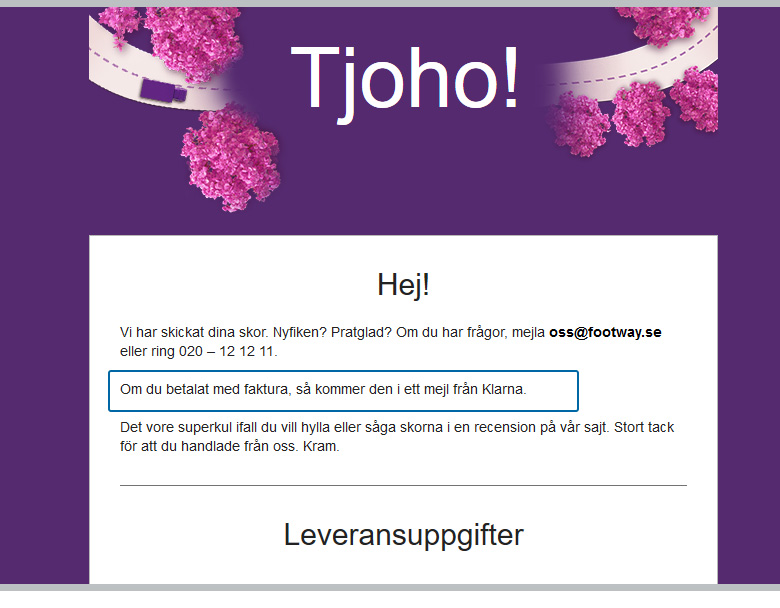
Footway, i det här fallet, utnyttjar inte helt sin data här. Jag valde att betala med Klarna, vilket de naturligtvis vet om. Istället för att skriva som de gör ska de naturligtvis skriva något i stil med: ”Du valde att betala med Klarna. Håll utkik efter ett mail från dem med fakturan.” Väldigt enkelt och ger mer trygghet i hur man betalar – eller om man t.om. glömt hur man betalade så får man en påminnelse.
Här skulle man också kunna ge förslag på andra skor som passar till dem jag köpt och kanske till och med ge rabatt om man köper direkt. Här finns det stora utrymmen för att testa sig fram och med relativt enkla medel skapa merförsäljning i ett läge då kunden ofta är mottagbar för det.
Zalando
Ännu värre är Zalando. De skriver all information i brödtext, vilket gör det lätt att missa och jobbigt att läsa. Känslan av trygghet, som jag tidigare nämnde, försvinner mycket i att de måste förklara olika scenarion i texten.
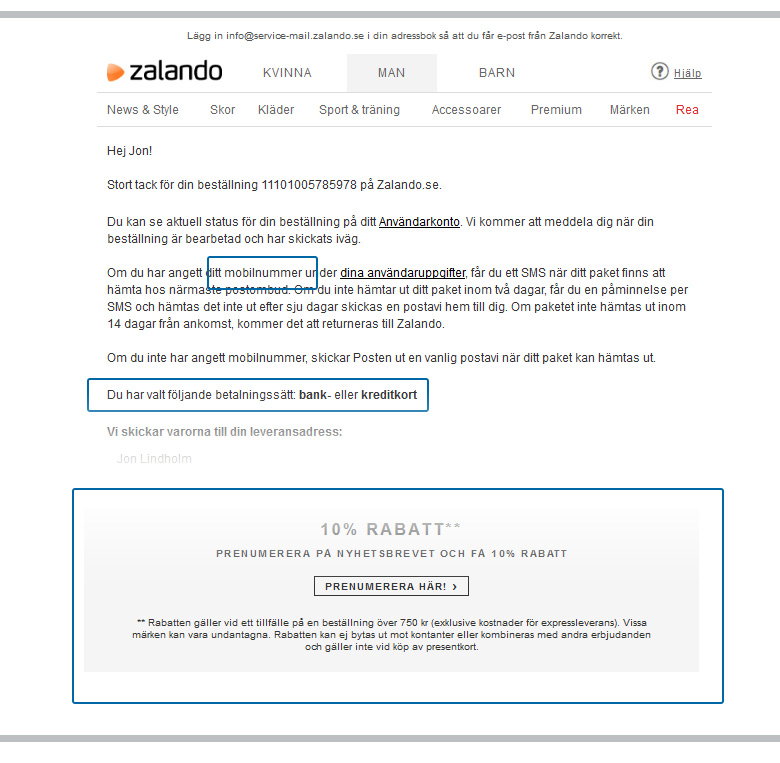
I min beställning skrev jag in mitt mobilnummer, adress och mail.
Här borde de skriva ut mitt mobilnummer, vilket skulle göra att de slipper flera meningar i mailet som det ser ut nu. ”Vi kommer skicka ett SMS till dig på 070-123 45 67 när paketet finns att hämta hos dit närmaste postombud.” Hur mycket trevligare är inte det?
Jag betalade ordern med mitt kort, men istället för att skriva att allt är betalt och klart så väljer de alltså att skriva ut det väldigt kryptiskt. ”Du har valt följande betalningssätt: Bank- eller kreditkort.” Kom igen!
Zalando försöker ändå med att ge mig 10% rabatt om jag skriver upp mig för deras nyhetsbrev. Att jag redan prenumererar på det verkar inte spela någon roll. Detta skapar frågor istället för att fokusera på det bra erbjudandet.
Genom att använda den data (information) jag skrev in vid köpet plus mina tidigare köp så skulle de kunna ta bort mycket av den krångliga texten och istället lyfta fram produkter som jag troligtvis skulle kunna vara intresserad av.
De kan fortfarande ge mig rabatt men istället för att få den via att jag registrerar mig för ett nyhetsbrev – som jag alltså redan är prenumerant på – så skulle det t.ex. kunna vara att jag får 10% om jag tipsar en kompis om Zalando.
Finns det några bra exempel då?
Visst finns det bra exempel! Hotels.com är en favorit till mig. De arbetar inte med merförsäljning i bekräftelsemailet utan de arbetar bara med att göra mig som kund trygg i mitt köp, vilket är helt rätt i deras fall.
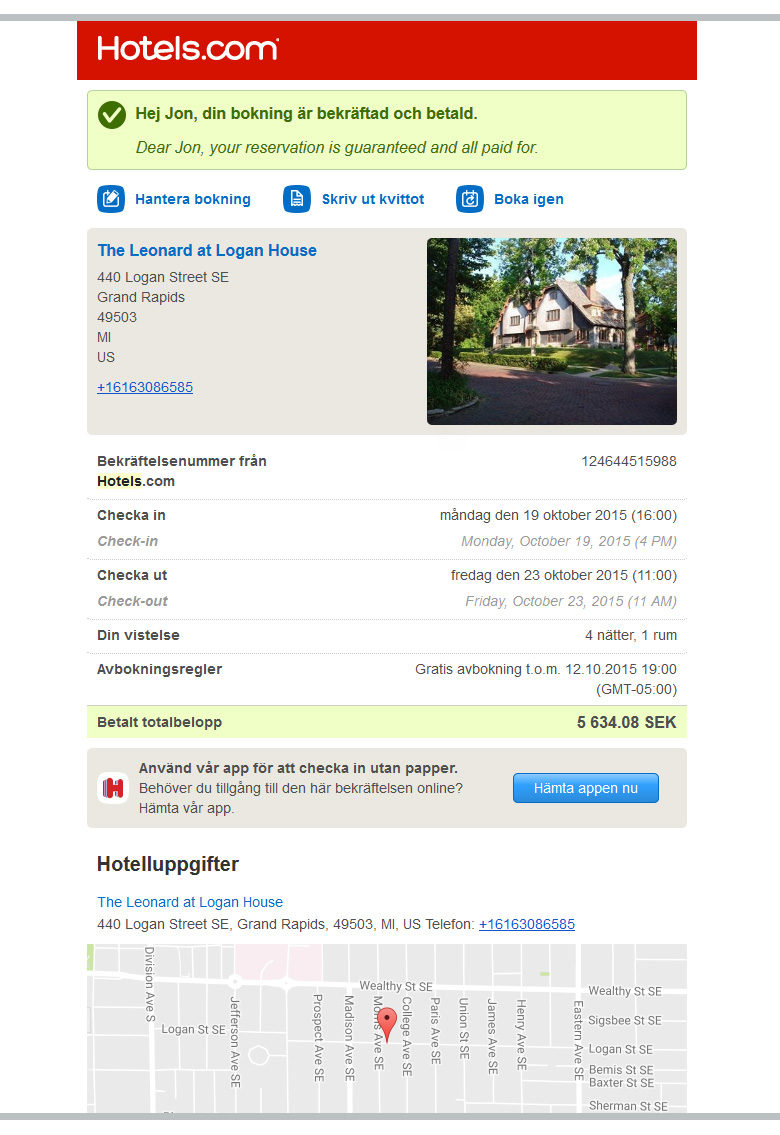
Först och främst så är det först man ser att allt är betalt och bekräftat. Inte gömt i en brödtext utan stort och tydligt så jag släpper den första oron. De ger mig sen bild på hotellet, adress med länk till karta, telefonnummer till hotellet och precis den information jag som kund är ute efter. Den snyggaste detaljen måste ändå vara att de först skriver informationen på ditt förvalda språk men sen lägger de även till språket i det landet du bokat i. Vilken skön detalj är inte det!?
Det finns fortfarande stor potential och möjligheter vad gäller att använda kundernas data i kommunikationen. I dessa fallen var det enbart bekräftelsemail men man ser liknande vid nyhetsbrev och andra marknadsföringskampanjer.
Slutsatsen blir då: Använd ALL data du har för att förbättra kundupplevelsen, även om det skapar lite merjobb för dig. Det andra är att tänka på de små detaljerna. Vad behöver kunden veta i just detta skede och hur kan vi överträffa förväntningarna?
Ladda ner Vansbro-posters
av Jon Lindholm (lindholm)
den 08 July 2016 kl 14:03
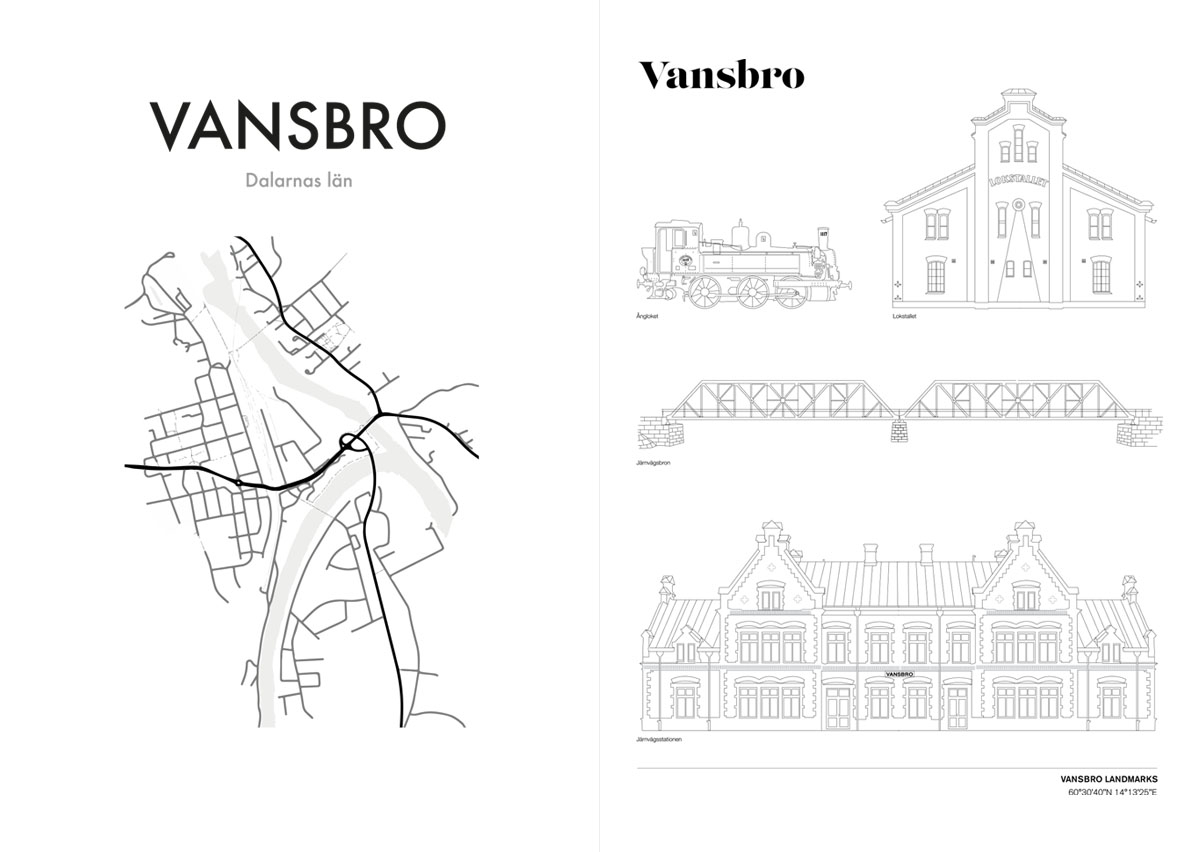
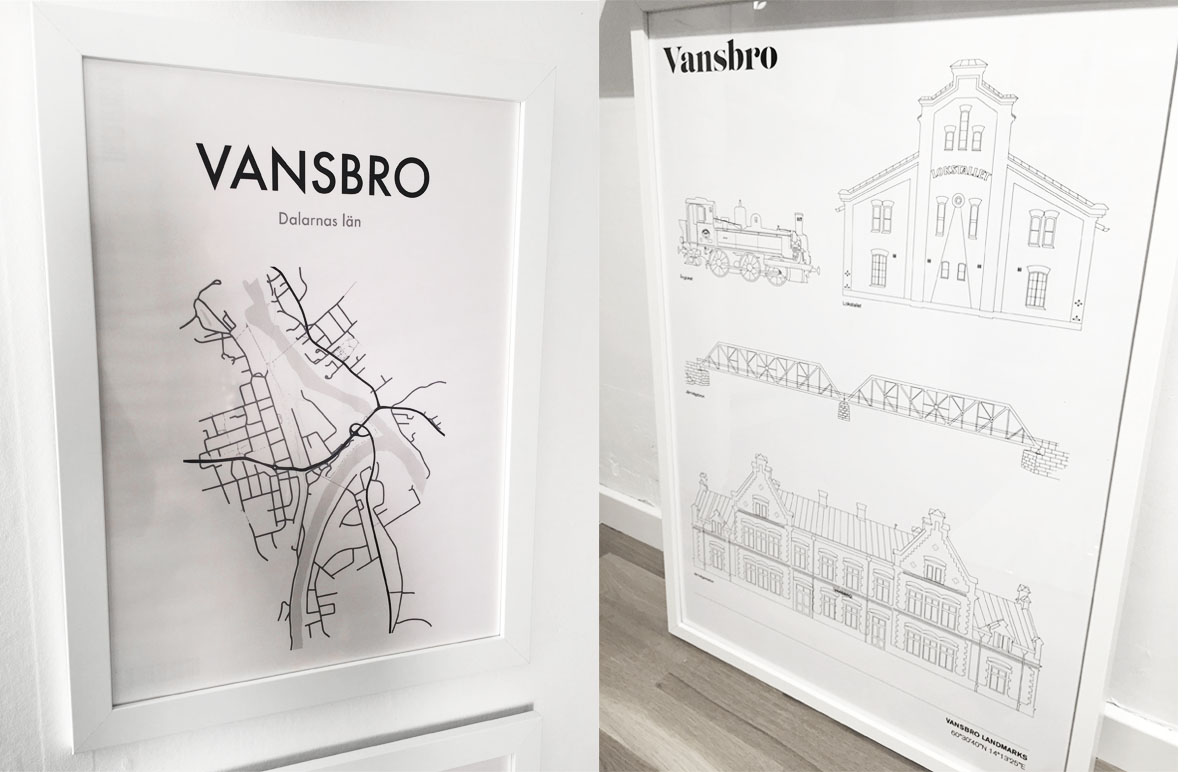
Något man ofta ser på inredningssiter är posters med rena motiv i form av svartvita kartor. Dessa är snygga och ger ett häftigt uttryck på väggarna. Tanken om att göra något liknande, fast mer lokalt, slog mig för ett tag sedan. Därför lägger jag nu ut två varianter av dessa posters föreställande Vansbros gatunät och Vansbro Landmarks, dvs. några utvalda byggnader som har betydelse i gatubilden. Liknande Landmarks-posters finns att köpa över Stockholm, London och New York, för att nämna några städer. Och nu finns även Vansbro i detta angenäma sällskap.
Vansbro Landmarks-postern är konturerna av de ånglok som står efter Järnvägsgatan, Lokstallet sett från ena kortsidan, järnvägsbron som går över Vanån och sist, men inte minst, är såklart järnvägsstationen med. Ladda ner dem och be ditt lokala tryckeri att skriva ut dem.
Ladda ner
Ladda ner poster av karta över Vansbro. Postern är gjord i A3-format (297mm × 420mm) men går att skriva ut i andra storlekar med.
Ladda ner postern Vansbro Landmarks. Postern är gjort 500mm × 700mm men går att skriva ut i andra storlekar.
Såhär snygga blir de inramade.

Läst under 2014
av Hans Persson (unicorn)
den 02 January 2015 kl 08:59
Vad som däremot är noterbart är att jag visst läst mycket mer på engelska än under de närmast föregående åren. Under 2011-2013 kom jag aldrig upp i mer än 38% engelska böcker som mest. I år blev det 67%. Inte mig emot egentligen och en tillbakagång till hur det varit förr när jag flera år passerade 90% men det ett tag sedan sist.
Engelska vet jag å andra sidan att jag kan läsa obehindrat. Vad jag skulle vilja är att komma igång att läsa på tyska. Under 2014 har jag läst ett par tidskrifter på tyska och börjat på en ungdomsroman men jag har inte kommit så många sidor i den och får erkänna att det än så länge går lite trögt. Jag får se det som ett mål för 2015 att lära mig att läsa på tyska.
De bästa romanerna jag läste under 2014:
- Mats Strandberg & Sara Bergmark Elfgren: Nyckeln
- Jo Walton: Among Others
- Neil Gaiman: The Ocean at the End of the Lane
- Cory Doctorow: Pirate Cinema
- Simon Stålenhag: Ur varselklotet
- George R. R. Martin: A Dance with Dragons
- Robert Kirkman: The Walking Dead
- Greg Rucka: Lazarus
- Liv Strömqvist: Prins Charles känsla
- Craig Thompson: Habibi och Blankets
- Alison Bechdel: Fun Home: A Family Tragicomic
Friends arena
av David Hall (dp)
den 13 June 2014 kl 16:15
[bambuser id=”4700375”]
2014-12: Joe Hill: Alpha & Omega
av Hans Persson (unicorn)
den 14 April 2014 kl 20:08
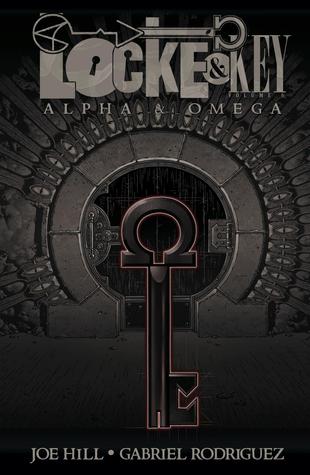
I den här avslutande volymen får vi så klart en del extra fyrverkerier innan upplösningen som jag tycker fungerar bra. Jag vill inte avslöja några detaljer men saker som jag förväntat mig skulle vara väsentliga utan att veta exakt hur blev mycket riktigt det och gav dessutom en extra knorr till själva berättandet.
Man kan också notera att Hill gör en liten homage till pappa i en scen. Som alltid med referenser är det inte alla som kommer att förstå den, men här konstaterar de inblandade själva efter händelsen att det är just ingen i deras omgivning som förstår dem så det är väl inte mer än rätt att även en del av läsarna inte gör det.

Jag är faktiskt lite sugen på att läsa om hela serien en gång till utan långa uppehåll mellan varje album (jag har köpt dem allt eftersom de kommit ut hela vägen) för att få lite bättre koll på handlingen genom att läsa hela på en gång.
Joe Hill: Alpha & Omega
Illustrationer: Gabriel Rodriguez
IDW, 2014
192 sidor
ISBN: 978-1-61377-853-1
Blogg 100 som Flipboard-magasin
av David Hall (dp)
den 01 March 2014 kl 17:36
Jag väljer ut inlägg från Blogg 100 och lägger ut i ett magasin på appen Flipboard:
Kriterierna för mitt urval är helt godtyckliga men andemeningen är att jag själv ska tycka det är intressant och/eller att jag tror att andra tycker det är intressant att läsa.
Själv tänker jag inte lova 100 inlägg närmaste 100 dagarna på denna blogg. Kanske kommer det ett och annat inlägg här. Däremot tänker jag och mina kolleger skriva på bloggen http.tv4.se. Imorgon kommer mitt första inlägg som en del av Blogg 100.
Senast jag bloggade på jobbloggen var från Las Vegas när jag bevakade International Consumer Electronics Show för TV4:s räkning.
PuTTY-url 0.63
av tobbez
den 07 August 2013 kl 23:36
I just released PuTTY-url based on PuTTY 0.63. PuTTY-url is a patch that adds support for clickable URLs to PuTTY.
You can download it from http://ryara.net/putty-url/.
Make sure to update, since PuTTY 0.63 includes fixes for four security issues. See the PuTTY web site for more information.
Upgrading firmware on the Linksys SRW2024 without using the web interface
av tobbez
den 29 November 2012 kl 13:55
This is useful if, for example, the web interface keeps resetting the connections.
Upgrading the firmware requires first updating the boot code, and the regular console in the earlier firware doesn’t have support for flashing the boot code. However, there is a hidden IOS-like cli available, that makes it possible to upgrade the boot code over tftp. An additional benefit is that it is much faster than using xmodem.
The steps
- Setup a tftp server on your machine, serving the files
srw2024_16_boot-101.rfbandls20xx-12230.ros(download from Cisco) - Connect your computer to the switch using ethernet and serial cables.
- Boot the switch.
- Log into the console.
- Press C-z.
- On the new promt, type
lcliand press enter. - To upgrade the boot code, type
copy tftp:///srw2024_16_boot-101.rfb boot - Then upgrade the firmware:
copy tftp:///ls20xx-12230.ros image - Lastly, restart the switch:
reload
That’s it.
As an aside, please note that the web interface only works in Internet Explorer, so if it seems like it doesn’t work, it’s probably because your’re using another browser.
Gott Nytt År! (igen)
av Per Jonsson (poj)
den 31 December 2010 kl 21:42
Det har varit lite dåligt med postningar på bloggen, men nu är det i alla fall dags att önska ett Gott Nytt År!
Ett nytt år som är det näst sista på väldigt länge som har en dag där tvåsiffrigt årsnummer, månad och dag i månad alla har samma värde. Efter den 11 november 2011 är det bara 12 december 2012 kvar innan man får vänta ända till den 1:a januari 2101 innan det går igen, och det är fasligt länge.
Hoppas att 2011 eller 0x7DB blir ett minst lika intressant år som 2010!
Bacon och Broccoli
av Per Jonsson (poj)
den 26 September 2010 kl 17:07
Vissa kombinationer råkar man bara kombinera, och sen är man fast. Bacon och Broccoli är en sådan kombination. Dessutom låter det trevligt.
AVR, Gentoo and Paludis
av Thomas Axelsson (axl)
den 30 December 2009 kl 00:09
As the crossdev scripts don't really wants to play nice with Paludis the packages have to be "created" manually. This is really a simple procedure as the packages themself already works for different targets, they just need to be told. I got the information on how to do it from the Gentoo wiki.
First one needs a repo for the cross avr chain. We will call it cross-avr. It is created by putting this configuration file in /etc/paludis/repositories:
master_repository = gentoo
format = ebuild
location = /var/paludis/repositories/cross-avr
names_cache = /var/cache/paludis/names
write_cache = /var/cache/paludis/metadata
And to get the files in the repo, make the directory and create symbolink links for the required packages:
mkdir /var/paludis/repositories/cross-avr/{cross-avr,profiles} -p
cd /var/paludis/repositories/cross-avr/cross-avr
ln -s /usr/portage/dev-embedded/avr-libc
ln -s /usr/portage/sys-devel/binutils
ln -s /usr/portage/sys-devel/gcc
ln -s /usr/portage/sys-devel/gdb
The repo also needs to be named and as the category is not in the master tree (portage) it needs to be added to the categories file:
cd ../profiles
echo cross-avr > repo_name
echo cross-avr > categories
Finally we need to tell paludis to use the avr-gcc for the other cross-avr packages, by placing this in /etc/paludis/bashrc
#cross-build avr
if [[ "${CATEGORY}" == "cross-avr" ]]
then
    if [[ "${PN}" != "gcc" && "${PN}" != "binutils" ]]
    then
        CBUILD=${CHOST}
        CHOST=avr
        CFLAGS="-Os"
    fi
fi
Now we have the ("auto-syncing" :D) repo set up!
To make sure that paludis knows about the new packages we run:
paludis --regenerate-installable-cache cross-avr
Next up is the installation. Do a pretend to see what paludis will pull in:
paludis cross-avr/binutils cross-avr/gcc cross-avr/avr-libc cross-avr/gdb -ip
Here it is important to note all the use flags for gcc. My experience is that most of them will break avr-gcc and my recommendation is to turn them all off.
At last we are ready. Start the build and grab a mug of cocoa.
While you wait it may be interesting to know that avr-libc will place the libs in /usr/avr. And if you want to start playing with simavr you need to change AVR_ROOT, in its Makefile.common, to this path. But more on that another time ;)
When the packages are installed you may want to create a symlink in /usr/avr/lib to /usr/x86_64-pc-linux-gnu/avr/lib/ldscripts (substitute architechture as appropriate) because ld will have problems finding the linker scripts otherwise. (/usr/libexec/gcc/avr/ld: cannot open linker script file ldscripts/avr4.x: No such file or directory, Gentoo bug)
Now you can compile your avr projects with avr-gcc! Happy hacking!
Custom PATH in KDE run dialog
av Thomas Axelsson (axl)
den 29 May 2009 kl 18:31
The solution is to put the export command in a file called ~/.xprofile
export PATH="/home/thomas/bin:${PATH}:/home/thomas/installs/bin"
(I keep all my user installed apps in ~/installs/bin ;))
Stockholm beer and whisky.
av bjowi
den 29 September 2007 kl 19:45
Kom till Villevalla! Nu.
av bjowi
den 06 September 2007 kl 19:26